Case study Roqqu · December 2025 to now
Futures trading, for the rest of us.
Derivatives are powerful, and for most people they are also confusing and risky. Roqqu wanted to put them within anyone's reach. I led design: I designed the core screens from scratch, with one other product designer, from the first screen to the beta.
- The problemDerivatives trading was built for specialists, with a lot of noise and a lot of risk.
- What I didLed design: I owned the core screens and stakeholder management, and one other product designer took the flows end to end.
- The result₦12B+ processed and 33K+ traders onboarded in the first 100 days.
Roqqu's figures for the first 100 days of Contracts, shared by the CEO with the team. They reflect the whole team's work and market conditions, not design alone. Design owned the product experience from the first flow to the beta, with two product designers.
01 The brief
An idea that wouldn't go away.
Contracts began as an idea in 2022 that felt too early for the industry, so it was set aside. In December 2025 the team decided to give it a shot. A few weeks later it went into beta.
It is built on the Arbitrum network, using Hyperliquid's HyperCore matching engine, and the team calls it on-off-chain, because it lives in both worlds. My job was to make all of that feel simple.
We stripped away all of the noise that made trading derivatives literally hell on earth and made it into what ANYONE can do.
What success meant
- Bring derivatives to ordinary traders, not only specialists.
- Keep the power: long and short, leverage and several order types.
02 The challenge
Power and risk, on the same screen.
Leverage can multiply a gain and a loss. A good futures screen gives people control without hiding the danger, and says every risk in plain words.
Our trader
Our first trader was our CEO, Eseoghene Benjamin Onomor, who trades for real. In his words, derivatives tools were full of noise. That made him a demanding persona: someone who knows what a good trading screen should do. This is a persona drawn from one real trader, not a research panel, and it gave us a clear brief for every screen.
03 How I designed it
From first screen to first trade.
There were no sketches or flow diagrams. We needed to ship fast, so the core screens went straight into design, from scratch. The steps below follow the path a trader takes.
Who owned what
What I owned
The core screens and stakeholder management.
What the other designer owned
Completing the flows, end to end.
How we worked
Constant working sessions, and we reviewed each other's work.
- Who decided what. The other designer and I decided together, and I made the call when we disagreed.
- Who I handled stakeholders for. The CEO, product, engineering, and compliance and marketing, on wording and risk notices.
Working with engineers
- Daily build reviews. I checked the designs against real builds with the engineers every day. Screens went over in Figma, with live walk-throughs.
- Live numbers. Liquidation price, margin and PNL are calculated live, so we agreed with engineers what each screen shows.
- Real traders on real builds. Feedback from traders on staging and beta builds went straight into the next review.
- 01
The way in
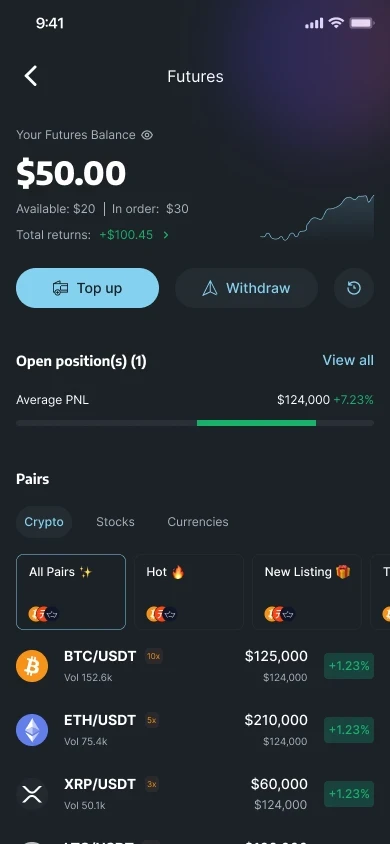
Entry and fundingContracts sits in a Markets tab, so futures feel like part of Roqqu. The entry screen says what it is in one line, a short guide explains how to trade, and before anyone trades, a funding screen explains the stablecoin balance (USDT or USDC) and the contract wallet.
EntryMarkets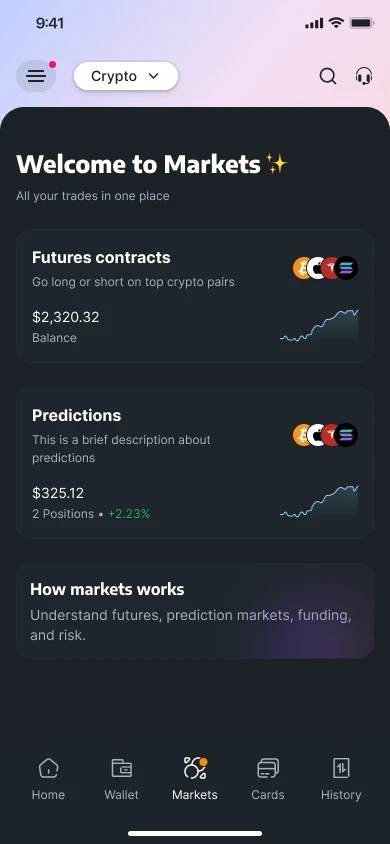
MarketsThe Markets tab, with futures first. EntryLearn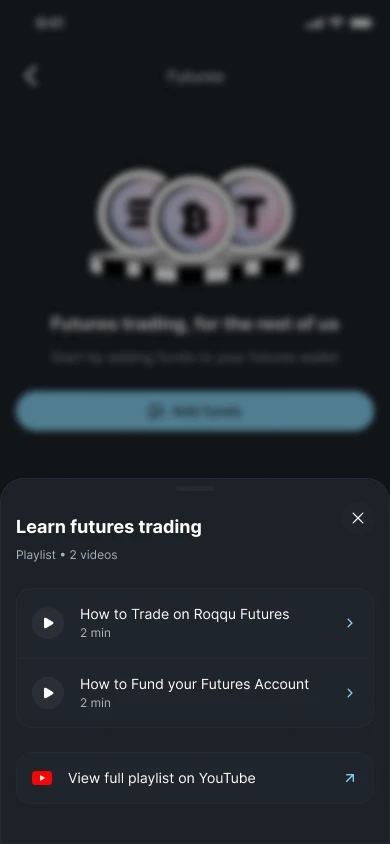
Learn futures tradingTwo short videos, one tap away. FundingExplainer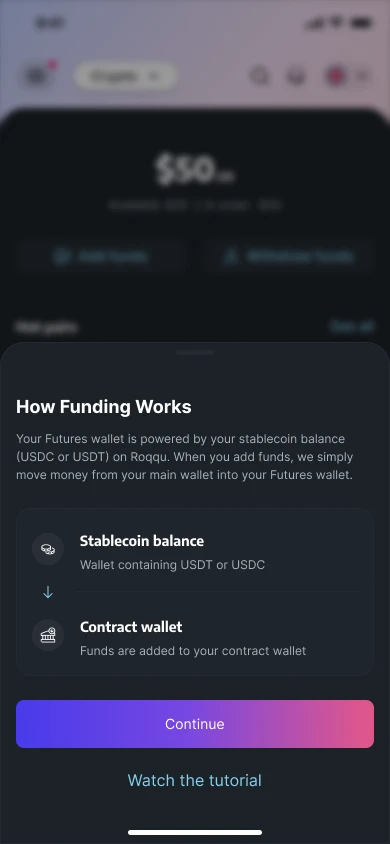
How funding worksStablecoin balance, contract wallet. FuturesHomeFutures homeBalance, open positions and pairs. - 02
Taking a position
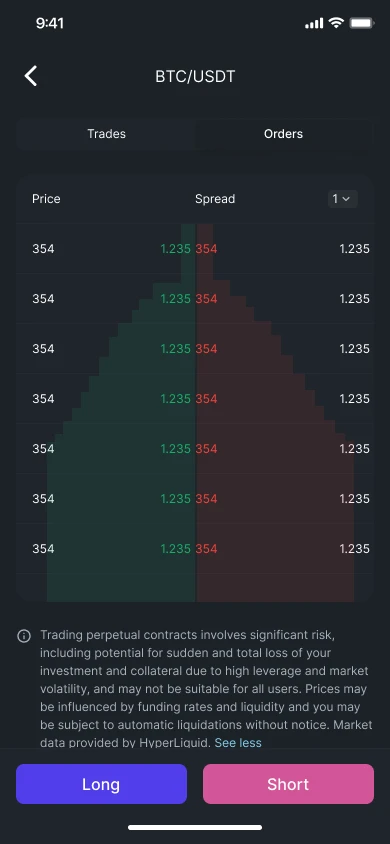
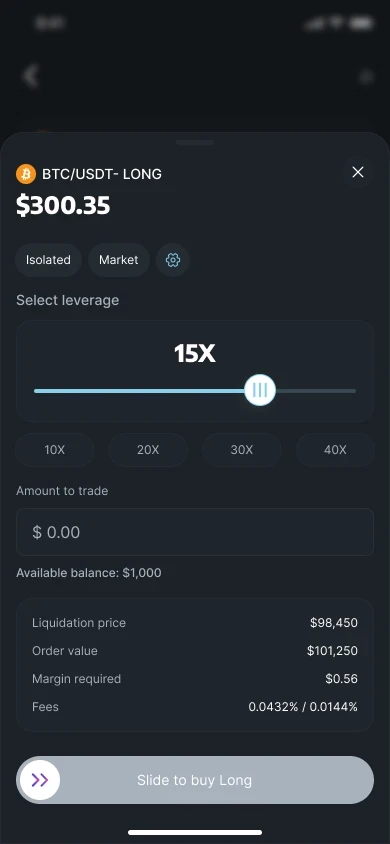
The core flowA pair opens to a price, a chart and an order book, with Long and Short always in reach and a risk notice beside them. Leverage is set on a slider, with presets for 10X to 40X. Before you commit, the screen shows the liquidation price, order value, margin required and fees. The order is placed with a slide to confirm, so a tap is never enough.
PairDetail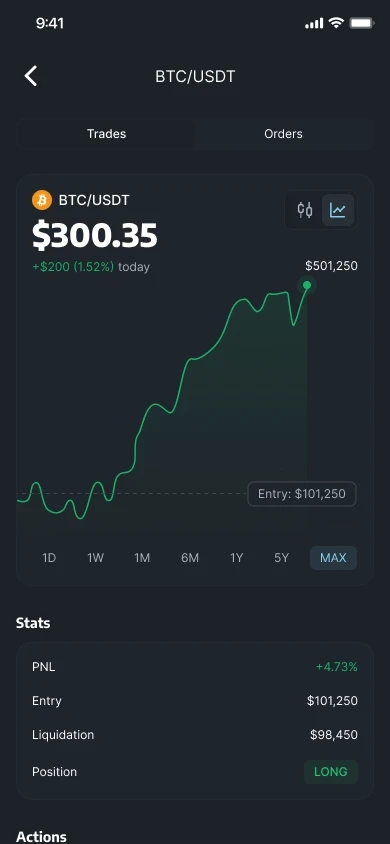
Pair detailPrice, chart and trade stats. PairOrder bookOrder bookLong and Short in reach, with the risk notice. TradeMarketMarket orderLeverage, amount and slide to confirm. TradeLimit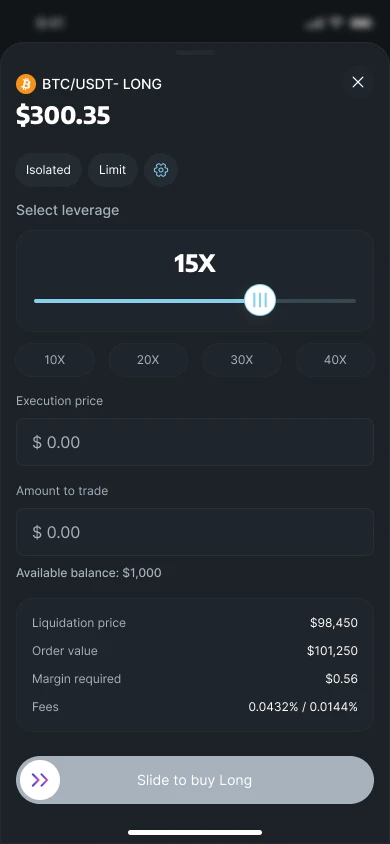
Limit orderSet the price you want. TradeTrigger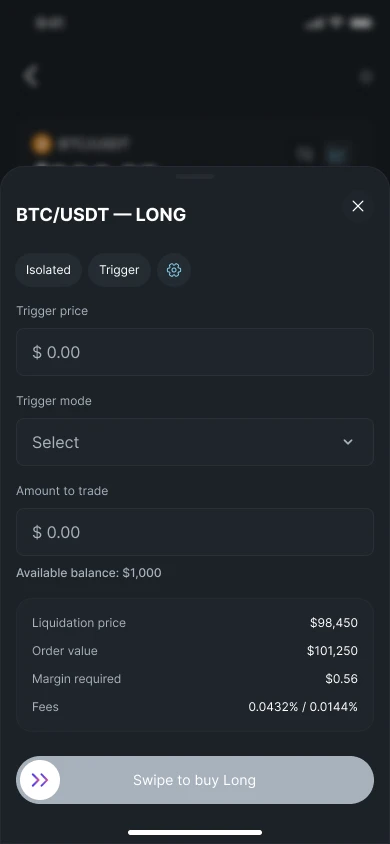
Trigger orderFire an order at a price you choose. - 03
Managing the risk
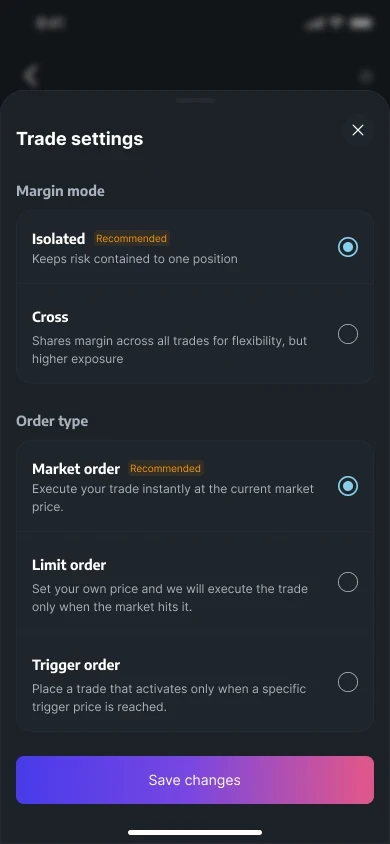
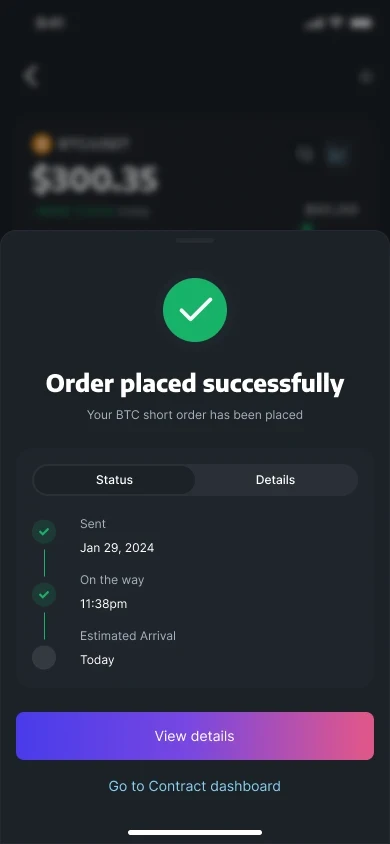
Controls and confidenceMargin mode and order type each get a sentence in plain words. An open position has its own screen, with a line or candlestick chart, stop loss and take profit you can change, and the PNL, entry and liquidation price. A placed order shows a status timeline, and closing a trade shows the PNL before you confirm.
SettingsMarginTrade settingsEach option says what it does. PositionOpen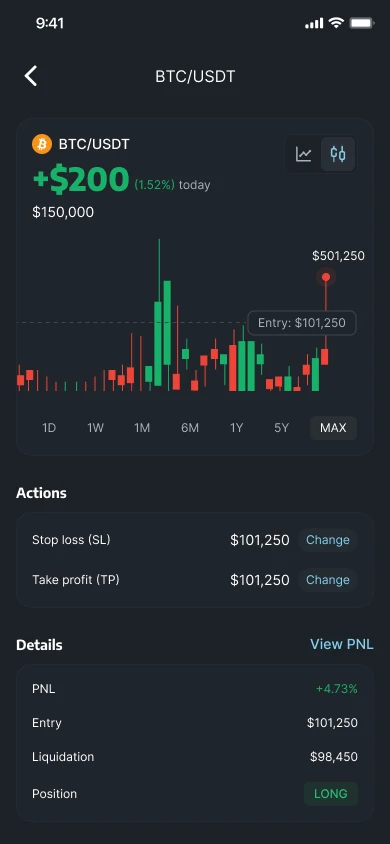
Open positionLine or candlestick chart, stop loss and take profit. AfterSuccessOrder placedA status timeline shows what happens next. AfterClose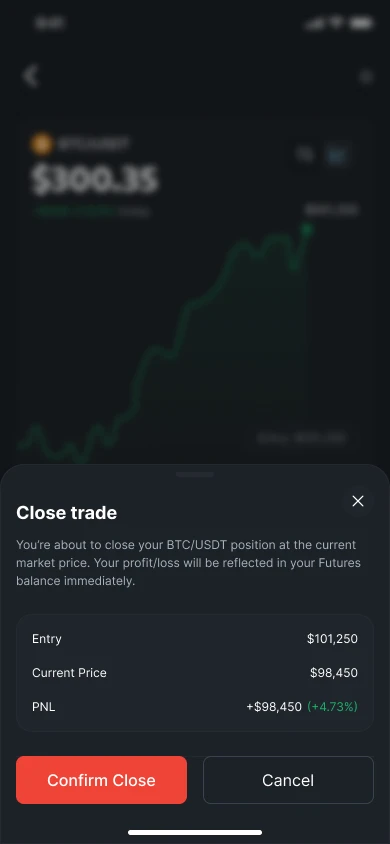
Close tradeSee the PNL before you confirm.
04 Trade-offs
Three choices that shaped it.
These are the choices that shaped the design, and what each one cost.
- 01
Ship fast, skip the paperwork
The constraintA few weeks from decision to beta, and an idea nobody had built before.
What I choseNo sketches and no flow diagrams. I designed the core screens from scratch, the other designer took the flows end to end, and every screen stayed as simple as it could be.
What it costThere is no early exploration to show, so this page has finished screens and not the process behind them. With no written flows either, the map of how Contracts works lives in the product itself.
- 02
Recommend isolated margin, don’t force it
The constraintCross margin shares margin across trades, which is flexible and riskier.
What I choseIsolated is marked as recommended and pre-selected, because it keeps risk contained to one position. Cross stays available, and says what it does.
What it costPower users wanted cross margin as the default, and had to switch to it themselves.
- 03
Slide to confirm, not tap
The constraintLeverage punishes accidental taps.
What I choseOrders are placed with a slide, and the figures that matter are in front of you first.
What it costExperienced traders find a slide slower than a tap. I accepted that, because one accidental order on leverage costs far more than a second of friction.
05 What happened
Fast, from the first week.
Within days of the beta, Contracts passed $500K in volume, with thousands of people onboarding. By day 100 it had processed ₦12B+, with 33K+ traders and 36 crypto assets, 17 tokenised stocks and 3 commodities to trade.
Figures are Roqqu's own, shared by the CEO with the team. They reflect the whole team's work and market conditions.
In the CEO's words
We’ve seen hyper growth before, we know what it looks like, but this is different, it is like it had been waiting to get out into the world all this while.
06 Reflection
And it's still day one.
Contracts started as an idea that felt too early for the industry. A few weeks later it was in beta, designed from scratch by two product designers working with product and engineering.
What I'm proudest of: making risk visible without scaring ordinary people away. Every figure that matters, from the liquidation price to the margin required, is in front of you before you trade, and people still came: 33K+ traders in the first 100 days.
What I'd do differently: test with real traders earlier, before the beta and not during it. And I'd write the core flows down sooner. Moving fast meant there was no flow map, which works for two designers and is harder for everyone who joins later.